mahautils.shapes
Tools for creating patterns of geometric shapes
The mahautils.shapes module is intended to facilitate building
complex patterns of geometric shapes. This can be useful when preparing
input files for simulations, such as files that specify port shapes and
locations for pumps and motors.
Shapes
The classes below can be used to specify and generate geometric shapes. These
objects provide the “backend” of the mahautils.shapes module,
and they are used by other tools in this module when generating geometry.
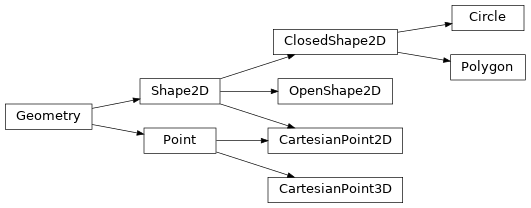
Abstract Geometry
|
Base class for representing arbitrary geometry |
|
Base class representing an arbitrary point in a space of an arbitrary number of dimensions |
|
Represents an arbitrary, two-dimensional shape |
|
A class that represents a closed, two-dimensional shape |
|
A class that represents an open, two-dimensional shape |
2D Geometry
|
Class representing a point in 2D Cartesian coordinates |
|
An object representing a circle in the 2D Cartesian plane |
|
An object representing a closed polygon in the 2D Cartesian plane |
3D Geometry
|
Class representing a point in 3D Cartesian coordinates |
Layers and Canvases
Layers and canvases are “collections” that store shapes and allow more complex, multi-shape geometries to be constructed. A layer is a group of shapes, and a canvas is a group of layers.
For instance, in an axial piston pump, all of the high-pressure ports might be grouped in a layer, all the low-pressure ports might be grouped in another layer, and these two layers might be grouped into a single canvas (and different canvases could be created for different simulation time steps).